Redact PDFs properly, before they leave your hands.
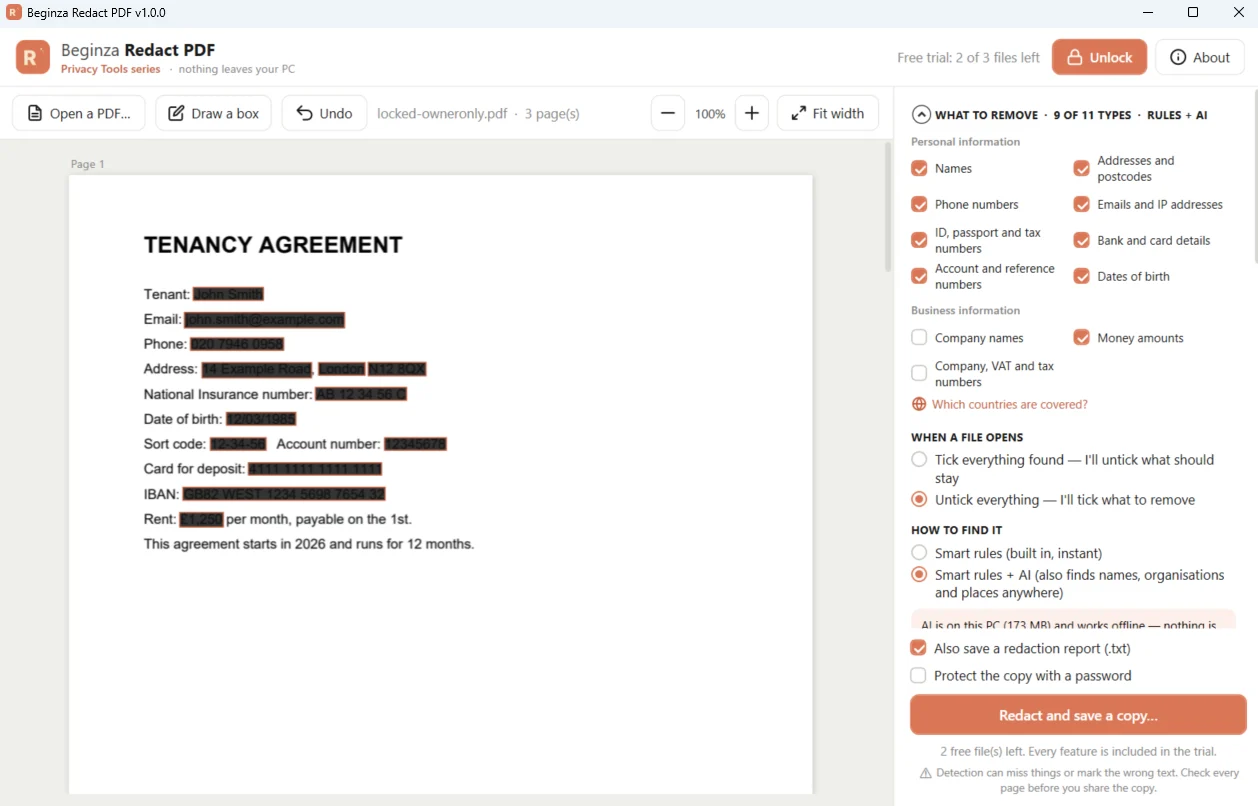
Redact PDF finds client names, money amounts, account numbers, case references and personal data, lets you check every box, then saves a copy with that information permanently removed. Everything happens on your PC, and your original file is never changed.
Free to try — redact 3 files with every feature · then unlock in the Microsoft Store
Why it matters
A black box isn't redaction.
Drawing black boxes in a PDF editor often only hides the text — it can still be copied out from underneath, searched or recovered.
Redact PDF really removes it. Every redacted page is rebuilt, so nothing under a box survives. The saved copy is checked automatically, and an optional report records what kind of information was removed and on which pages — never the information itself. Document properties, comments, attachments and hidden data are removed from the copy too.
Features
Finds what you shouldn't send.
Business information
- Money amounts — £, $, €, HK$, ¥ and more
- Company names — Ltd, LLP, plc, Inc, GmbH, 有限公司…
- Company, VAT and tax numbers, including UTR, EIN and HK BR
- Case, claim, matter, invoice and policy references
Personal data
- Names, addresses and postcodes — UK, Hong Kong, US, Canada, Europe
- Phone numbers and email addresses
- Bank accounts, sort codes, IBANs and card numbers
- NI, HKID, Social Security, passport and driving licence numbers, dates of birth
Built for repeat work
- Saved word lists — redact a client's names in every file
- Review every item one by one, with zoom and undo
- Search any word or phrase, including Chinese
- Draw boxes over signatures, photos and stamps
Scanned and protected files
- Reads scanned pages with Windows' text recognition
- Opens password-protected PDFs
- Protects the redacted copy with its own password (AES-256)
Checked and recorded
- Saved copy checked automatically
- Optional report of what kind of data was removed, and where
- Numbers with a check digit are verified, so look-alikes are ignored
Optional on-device AI
- Also finds names, organisations and places anywhere in the text
- 10 languages
- Runs on your PC — a one-time download of about 170 MB
Detection can miss information or mark the wrong text. Always check every page before you share the redacted copy.
How it works
Three steps.
Open a PDF
Drag it in or choose a file. Pick what to remove: personal data, business information, or both.
Check every box
Everything found is boxed and listed. Untick what should stay, draw boxes over anything else.
Save a redacted copy
Pages are rebuilt so nothing can be recovered, and the copy is checked. Your original is untouched.
Useful for
- Disclosure bundles
- Settlement documents
- Client statements
- Subject access requests
- HR files
- Bank statements
- Tenancy agreements
- Tenders and bids
Questions
Frequently asked
Is the redaction really permanent?
Are my documents uploaded anywhere?
Can it redact scanned PDFs?
Does it change my original file?
Will it find everything?
How much does it cost?
Guides
Related reading
Don't send a contract with hidden metadata
Author names, redlines and tracked-changes history can travel with a contract. How to check and strip them.
Data protectionHow to find hidden personal data on your PC
Old documents and spreadsheets often hold personal data you forgot was there.
Privacy guideHow to remove metadata from Word documents
Remove author names, company details and hidden personal information from Word files.
Redact PDF
Find and permanently remove names, amounts, account numbers and case references from PDFs before you send them.