The AI assistant that keeps client work on your PC.
Beginza AI drafts letters, summarises long documents and answers questions about your files — running on your own Windows computer. No account, no cloud AI, nothing uploaded. Made for lawyers, accountants, consultants and investors, and for anyone who wants AI that stays private.
Free on the Microsoft Store · Pro is a one-time purchase, no subscription · Windows 10 & 11 (64-bit)
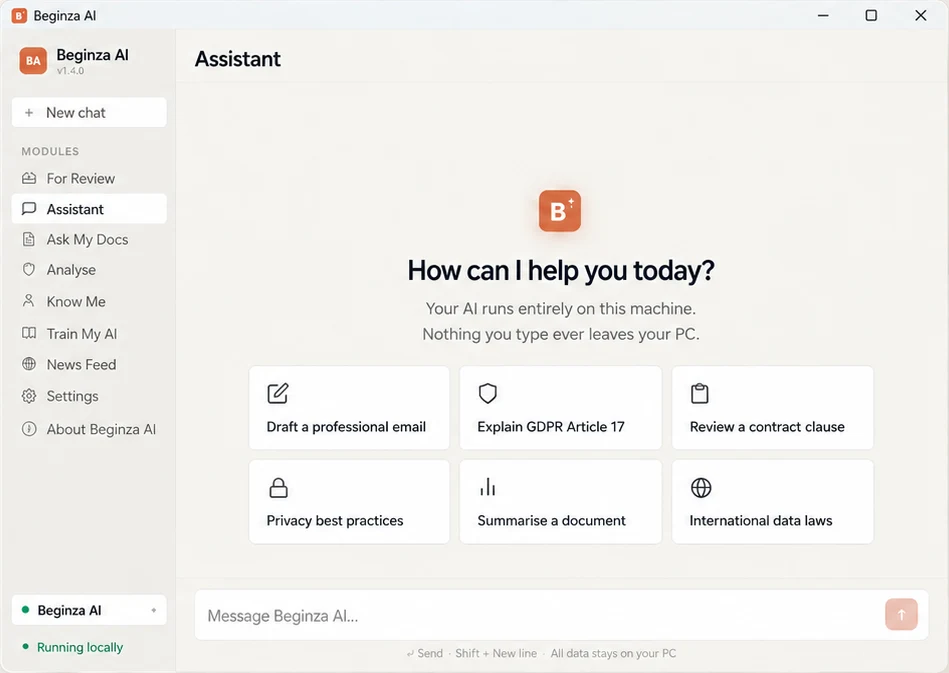
Why Beginza AI is different
Not just local AI. An AI that becomes yours.
Running an AI model on your PC is only the starting point. Beginza AI is built to remember how you work, learn from your own material and prepare things before you ask — without ever sending your work anywhere.
Private by design, not by policy
There is no Beginza server. Your work can't be stored, read or used to train someone else's model, because it never leaves your PC.
It remembers you
Every conversation adds to what it knows about your work, preferences and decisions — and you can see and edit all of it in Know Me.
It learns your field
With Pro, Train My AI builds your own version from examples you approve, so it writes in your style and knows your terminology.
It works ahead of you
For Review prepares a daily briefing of deadlines, renewals and sensitive-data alerts. Nothing happens without your approval.
Swipe sideways to compare →
| Beginza AI | Online AI assistantsRun on the provider's servers | Other local AI appsRun on your PC | |
|---|---|---|---|
| Your documents and conversations stay on your PC | Always | Sent to the provider's servers | Yes |
| No account or sign-in | None needed | Usually needs an account | Usually |
| Remembers your work between chats — and shows you what it knows | Know Me: see and edit everything it has learned | Some do, stored on their servers | Usually starts fresh each chat |
| Learns your field and writing style | Train My AI (Pro): from examples you approve, no code | Custom instructions only | Possible, but technical |
| Works ahead of you | For Review: daily briefing of deadlines, renewals and data alerts | Some offer briefings, run in the cloud | Waits to be asked |
| Answers about your files with page references | Ask My Docs | If you upload the files | Some, with extra set-up |
| Choice of AI models | One model, set up for this job | The largest models | Wide choice — ideal for enthusiasts |
To be fair to the others: online AI services run larger models, and other local AI apps are great if you enjoy trying many different models. Beginza AI is built for something else — a private assistant for confidential work that gets to know you, set up for people who don't want to tinker.
Features
Everything runs on your computer.
Assistant
- Draft emails and letters
- Summarise long documents in seconds
- Think through problems
- Remembers past conversations, so you don't repeat yourself
Ask My Docs
- Ask questions about PDF, Word, Excel and text files
- Answers with page references you can check
- Keep contracts, reports and notes in one private library
Privacy Check
- Find names, emails, NHS and passport numbers in a document
- An overall risk rating before you send it
Stock Analysis
- Bullish, bearish or mixed reading of news, earnings reports and analyst notes
- Key quotes and urgent alerts flagged first
- Nobody sees what you're researching
Know Me
- See and edit what Beginza AI has learned about your work
- Set its tone and rules — you stay in charge
For Review
- A daily briefing of deadlines, renewals and sensitive-data alerts
- Nothing happens without your approval
Responses come from an AI model running on your PC and can be wrong, so check important information. Stock Analysis is for information only and is not financial advice.
Free and Pro
Start free. Upgrade only if you need to.
Free
Everything you need to get started
- Assistant
- Ask My Docs
- Privacy Check and Stock Analysis
- Know Me
- For Review
Pro
One-time purchase · no subscription
- Train My AI — build your own version of Beginza AI from examples you approve, so it writes in your style and knows your field
- News Feed — follow trusted sources for your field; articles you approve become training material
How it works
Three steps.
Install from the Microsoft Store
Free download. No account or sign-in.
Let it set up once
On first start Beginza AI downloads its AI model (about 3 GB) and gets everything ready. This is the only time it needs the internet.
Work offline
Chat, add your documents and let it learn how you work. Your conversations, documents and training data stay on your PC.
Useful for
- Solicitors
- Accountants
- Consultants
- Investors
- HR and compliance
- Clinicians
- Researchers
- Anyone who wants private AI
Questions
Frequently asked
Does Beginza AI send my documents anywhere?
How is it different from online AI assistants?
Will it run on my PC?
What does Pro add?
Is there a user guide?
Guides
Related reading
Using AI with confidential documents without uploading them
Get help from AI with contracts and client files while keeping them on your own PC.
ComparisonBest local AI assistant for Windows
An honest comparison of the serious local AI options for Windows.
Privacy guideDon't send a contract with hidden metadata
Author names, redlines and tracked-changes history can travel with a contract. How to check and strip them.
Beginza AI
A private AI assistant that drafts, summarises and answers questions about your documents — on your PC.